

Free Accounts
What's on this page
About Free Accounts
Qualtrics offers a free survey account that allows prospective users to get a sense of the Qualtrics platform as they consider purchasing a full license. The purpose of the free survey account is to provide an environment where the point-and-click user interface can be experienced by building a survey, distributing it, collecting a few responses, and experimenting with our reporting tools.
Due to this purpose, there are a number of limitations on free survey accounts.
Free accounts are deleted after 13 months of inactivity. We will email you to remind you as this date approaches, so you can log in and export your Qualtrics data if you need to. So long as you are logging into your account to use it, your account will not be removed. Logging in will reset the 13 month timer.
Qtip: As a result of these limitations, we encourage free account users to evaluate the complexity of research they are attempting and to consider purchasing a Strategic Research license for more rigorous or substantial research. Although a Qualtrics Surveys free account is useful for simple surveys and basic data analysis, you can discover the full power of Qualtrics by signing up for a free 30-day trial of our professional-grade product or request a demo to see advanced features in action. To get the most out of Qualtrics, we recommend either purchasing a full license or checking to see if you can sign up for a full account with your organization instead, at no cost to you.

Usage Limits in Free Accounts
Free accounts are not designed for high-volume or long-term research projects. The following limits apply to free account usage:
- Only 3 active surveys at any given time (unlimited inactive surveys allowed)
- Only 30 questions per survey
- No emails allowed. Try other distribution methods like anonymous link and social media distribution.
- Only 500 responses per user, including retaken and deleted responses. Responses in progress will not count towards this limit until they become recorded responses. See the Recorded Responses page for more information about what counts as a recorded response.
Features and Restrictions in Free Accounts
Free accounts grant basic access to XM Platform essentials, but many capabilities are restricted to paid plans only. The following table details many of the capabilities and restrictions of free accounts. Premium features that are unique to the Strategy & Research, Customer Experience, or Employee Experience product suites are also restricted in free accounts.
| Product Area | Features in Free Accounts | Restrictions in Free Accounts |
|---|---|---|
| Survey builder |
|
|
| Customization and branding |
|
|
| Methodology |
|
|
| Survey distribution |
|
|
| Response management | View, filter, and edit responses |
|
| Reporting & analytics |
|
|
| Workflows | None | No Workflows |
| Account administration | None |
|
| Extensions and integrations | None | No API or third-party integrations |
| 24/7 support |
|
|
Qtip: Note that inserting media and hyperlinks requires the Allow All HTML Markup account permission to be enabled. The Allow JavaScript account permission must be enabled for proper video playback. These permissions cannot be enabled without upgrading your account.
For a more in-depth look at our experience management platform and all of our technology and service capabilities, you can request a demo on our website. The appropriate team will reach out to you in a timely manner to help you with this request.
Free Accounts Made Before November 2019
Free accounts made before November 2019 are being gradually moved to the new free account experience. Your account may have been made before this date if you see a difference in what features you have access to, such as the inability to access survey templates.
The term “trial” no longer refers to all free accounts.
Upgrading Your Free Account
If you are interested in getting access to more features, you can upgrade your free account from the Plans tab. See Upgrading a Free or Trial Account for instructions.
If you would prefer to speak to the Sales team about upgrade options and are not already in contact with a Qualtrics Account Executive, go to the Contact Us page and fill out the form to contact sales. You will be contacted about your upgrade request.
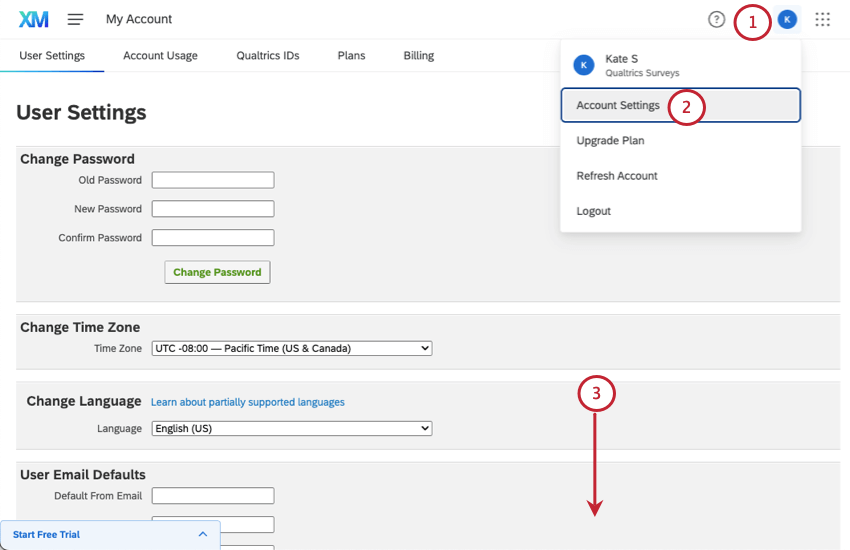
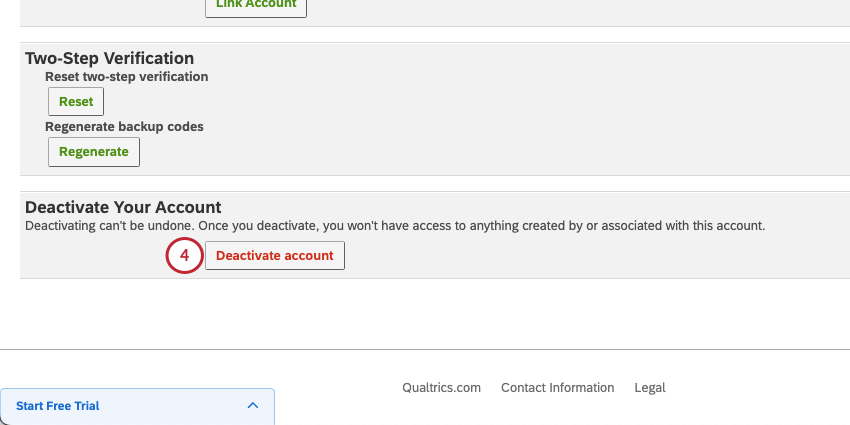
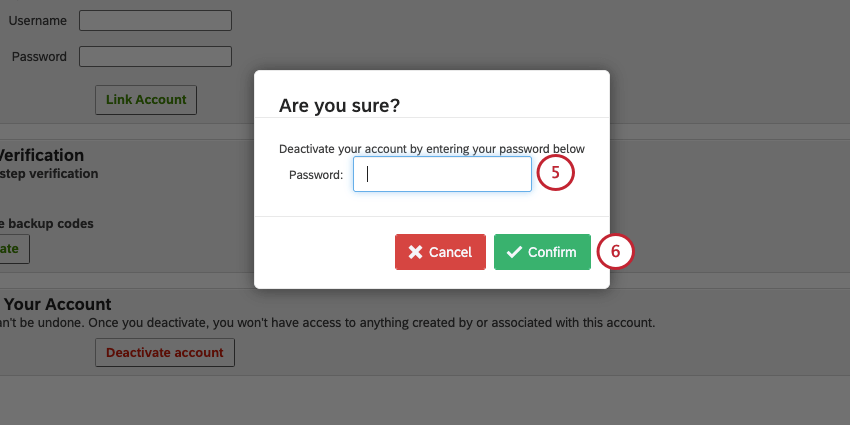
Deactivating Your Free Account
Warning: Deactivating your account will make it irretrievable. You will not be able to access it or its contents again. Only deactivate your account if you are absolutely sure that is what you want to do.

Qtip: Remember, you can export surveys and upload them to a new account. These surveys will not retain the same links. If you need to move data from one account to another, see User Moves for other options available to you.
FAQs
Why are the changes I made in the Rich Content Editor not showing up in my free / trial account?
Why are the changes I made in the Rich Content Editor not showing up in my free / trial account?
Why is my HTML, CSS, and JavaScript not working in my free / trial account?
Why is my HTML, CSS, and JavaScript not working in my free / trial account?
I accidentally made a free account instead of signing up with my university or correct affiliation. What should I do?
I accidentally made a free account instead of signing up with my university or correct affiliation. What should I do?
Contact Qualtrics Support to get help finding the correct organization signup page or moving your account to another license.
If you don't have anything to move from your free account, you can also deactivate the account yourself.
When does my free account expire?
When does my free account expire?
How do I remove the pop up at the end of my surveys that says “Thank you for taking this survey powered by Qualtrics”?
How do I remove the pop up at the end of my surveys that says “Thank you for taking this survey powered by Qualtrics”?
How can I delete my free account?
How can I delete my free account?
How can I get my surveys or account moved to another license?
How can I get my surveys or account moved to another license?
If you don’t want or don’t have anything currently in your account (no surveys, no contact lists, and no library messages), you can deactivate your own account. This way you will be able to more make an account with your new license and get started more quickly.
For details on all of the options offered you, see the User Moves page.
That's great! Thank you for your feedback!
Thank you for your feedback!